Showing posts with label Java. Show all posts

Sunday, August 7, 2011

Seven Java projects that revolutionized the world

http://vivta.org/web_images/7.jpg 
Over the last decade, several projects have traveled beyond mere adoption and had effects dominating the Java world, into software development in general, and some even further into the daily lives of users.

JUnit

Ported to Java by Kent Beck and Erich Gamma from Beck's work in unit testing in Smalltalk, JUnit has been largely responsible for popularizing test-driven development over the last decade. Many implementations have been created, in .NET, C, Python, Perl and just about every language in popular use.

Eclipse

As Java and its APIs matured in the early 2000s, the Eclipse IDE provided a way for programmers to be productive and negotiate the growing Java ecosystem. Eclipse was also the first major project to use the SWT UI toolkit, providing important competition to Sun's Swing and showing that Java programs can provide a rich native interface.

Spring

The Spring Framework has played an important role in enabling Java developers to be productive, managing a balance between simplicity and features. Spring gives Java developers a set of services providing commonly used application functionality such as data access and transaction management. As a competitor to Sun's Enterprise Java Beans system, Spring enabled an alternative and simpler path for Java applications.

Solr

The Solr server, and the Lucene search engine it encapsulates, has been for many years a simple and practical solution to providing search capabilities to web and enterprise applications. Solr's genius is in providing HTTP access to the powerful and fast Lucene search library, enabling it to become a part of any system, regardless of whether it is implemented in Java or not.

Hudson and Jenkins

Originally developed as Hudson, and now also as Jenkins, this continuous integration tool is a key part of a Java development setup. Jenkins provides automated build and testing of a software project, continuing in the footsteps of JUnit in enabling agile development on the Java platform. While both Hudson and Jenkins persist for now as forks of each other, it doesn't detract from the work of Kohsuke Kawaguchi in creating a world-class continuous integration platform and so enhancing the quality of much Java development.

Hadoop

This Java implementation of the famous MapReduce model is the powerhouse that has enabled most "big data" systems. By lowering the cost of extracting value from large data sets, Hadoop has made practical the personalization and advertising businesses of Facebook and Yahoo, and many other companies.Hadoop enables large-scale distributed computing by handling failure at the software level.

Android

Android programs undergo a further step to convert JVM bytecode to Dalvik bytecode — Dalvik being a virtual machine optimized for mobile devices. Google has been able to leverage Eclipse to provide software developers with a mature development environment for creating Android applications.
Oracle and Google are currently engaged in a lawsuit over a claim that Android infringes on multiple patents held by Oracle.

via [radar.oreilly.com]

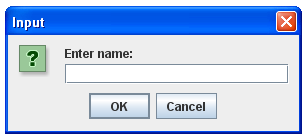
Java Programming Tutorial - 6 - Getting User Input

http://verticalhorizons.in/wp-content/uploads/2011/08/JOptionPane_User_Input_In_Java.bmp

The package that needs to be imported to accept user input is java.io. The java.io package contains classes and interfaces used for input and output.
The setup:
import java.io.*; 
class GetUserInput{ }

User input classes

To get user input, use the BufferedReader and InputStreamReader classes.
  • The InputStreamReader class - reads the user's input.
  • The BufferedReader class - buffers the user's input to make it work more efficiently.
  1. package com.tctalk.myapp.java.src;
  2. import java.io.BufferedReader;
  3. import java.io.IOException;
  4. import java.io.InputStreamReader;
  5. /**
  6. * ReaduserInput.java - [This code reads the user input data from command prompt]
  7. *
  8. * @author TechCuBeTalk.com
  9. * @version 1.0
  10. */
  11. public class ReaduserInput {
  12.     public static void main(String[] args) {
  13.         //  Ask the user to enter their name
  14.         System.out.print("Please enter your name: ");
  15.         //  To read user input create a reader object
  16.         BufferedReader br = new BufferedReader(new InputStreamReader(System.in));
  17.         String userName = null;
  18.         //  read the user input from command prompt by readLine() method
  19.         try {
  20.             userName = br.readLine();
  21.         } catch (IOException ioExcption) {
  22.             System.out.println("IO exception occurred!");
  23.             System.exit(1);
  24.         }
  25.         System.out.println("Welcome " + userName + "!! Have a Good day!!");
  26.     }
  27. }

For more practice, here's a demo:


via[techcubetalk.com]

Java Programming Tutorial - 5 - Variables

http://i.ytimg.com/vi/pXBJwFBvyjA/0.jpg

What is a variable?

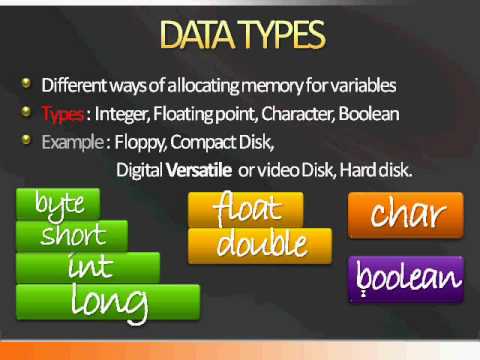
A variable is a container that stores a meaningful value that can be used throughout a program. For example one variable that stores the regular price of an item for calculating tax on it. Variables store this information in a computer's memory and the value of a variable can change all through out a program.

Declaring variables

Use these keywords when declaring your variables to set the data type of the variable.
Java data types
Keyword Type of data the variable will store Size in memory
boolean true/false value 1 bit
byte byte size integer 8 bits
char a single character 16 bits
double double precision floating point decimal number 64 bits
float single precision floating point decimal number 32 bits
int a whole number 32 bits
long a whole number (used for long numbers) 64 bits
short a whole number (used for short numbers) 16 bits

Example:
char aCharacter; int aNumber;
You can assign a value to a variable at the same time that it is declared. This process is known as initialization:
Example:
char aCharacter = 'a'; int aNumber = 10;
Declaring a variable and then giving it a value:
char aCharacter; aCharacter = 'a'; int aNumber; aNumber = 10;
NOTE: A variable must be declared with a data type or an error will be generated!

Naming variables

Rules that must be followed when naming variables or errors will be generated and your program will not work:
  • No spaces in variable names
  • No special symbols in variable names such as !@#%^&*
  • Variable names can only contain letters, numbers, and the underscore ( _ ) symbol
  • Variable names can not start with numbers, only letters or the underscore ( _ ) symbol (but variable names can contain numbers)


via [landofcode.com]

Java Programming Tutorial - 4 - First Program

http://pradigital-susel-duarte.wikispaces.com/file/view/apostila-java-350x328%5B1%5D.png/173374337/apostila-java-350x328%5B1%5D.png

Note: Before you start, you must have downloaded and installed the Java SE Development Kit.
It’s traditional to start learning a new programming language by writing a program called "Hello World". You can think of it as a very simple initiation into the ranks of Java programmers. All the program does is write the text "Hello World!" to your computer screen.
The basic steps we will follow for our Hello World program are:
  1. Write the program in Java
  2. Compile the source code
  3. Run the program
Note: Java is case sensitive. Remember this.
Here's a complete tutorial:


via [java.about.com]

Java Programming Tutorial - 3 - Downloading Eclipse

http://www.amscontrols.com/Libraries/Home_Page_Graphics/EclipseLogo.sflb.ashx 
Language IDE

Eclipse is well known for its Java IDE. However, there are Eclipse base language IDEs for most of the popular languages. Some are popular Eclipse open source project, such as CDT, and others are popular open source projects and commercial solutions.


Download Package
Eclipse IDE for Java Developers


Download Link: http://www.eclipse.org/

Java Programming Tutorial - 2 - Running a Java Program

http://java.sun.com/developer/onlineTraining/Programming/BasicJava1/Art/platform.gif
Creating Your First Application
Your first application, HelloWorld, will simply display the greeting "Hello world!". To create this program, you will: 
  • Create a source file
    A source file contains code, written in the Java programming language, that you and other programmers can understand. You can use any text editor to create and edit source files.
  • Compile the source file into a .class file
    The Java programming language compiler (javac) takes your source file and translates its text into instructions that the Java virtual machine can understand. The instructions contained within this file are known as bytecodes.
  • Run the program
    The Java application launcher tool (java) uses the Java virtual machine to run your application.
via [download.oracle.com]

Java Programming Tutorial - 1- Installing the JDK


http://javaboutique.internet.com/articles/ITJ/Images/jdk_install.gif

Installing the JDK on Windows

  1. For the Sun version of the JDK, enter the URL http://java.sun.com/j2se/1.4.2/download.html.
  2. From the Sun Developer Network page, scroll to find the heading J2SE v 1.4.2_12 SDK (that is, .12 or the latest version).
  3. Select Download J2SE SDK.
  4. From the Sun Developer Network page, accept the license agreement and scroll to the heading "Windows Platform - Java(TM) 2 SDK, Standard Edition 1.4.2_12".
  5. Select and download Windows Installation, Multi-language.
  6. Save and install the .exe file.
  7. If prompted, install the JDK to C:\j2sdk1.4.2_10.
  8. Set the JAVA_HOME environment variable to C:\j2sdk1.4.2_12

Saturday, August 6, 2011

Developing iPhone Applications using Java

http://cache.gawker.com/assets/images/gizmodo/2009/06/iphone3gs_03.jpg
You can easily build your own iPhone apps. Create, build & manage your own branded iPhone Apps. Creating iPhone applications using Java is the fastest, easiest and most affordable way to build your own app in minutes. So you just need some tutorials.